Casio PX-800 Privia Digital Piano with Weighted Scaled Hammer Action Keys
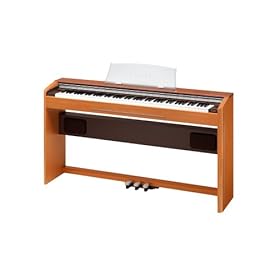
The PX-800, releasing in March, is another brand new addition to the Privia line. The PX-800 is equipped with the new revolutionary tri-element AIF sound source (Acoustic and Intelligent Filtering system). Its 128-note polyphony allows notes to reverberate naturally without being cut off during high-speed passages, affording a more natural sound. The PX-800 carries a large 40 watt (20w per side) sound system to effectively recreate the sound of a Grand Piano. A custom wood stand and 3-pedal unit is included, giving the PX-800 a unique European design and elegant appearance.
Remo Kids Konga 6.5x 15 – FIBERSKYN® 3 head Konga

Product Name: Remo Kids Konga 6.5x 15
Description: FIBERSKYN® 3 head Konga
Price: 65
Click here to check avalibility of the product
76-Key Electronic Keyboards!
If you are seriously considering learning to play the electronic keyboards, then a standard 61 keys or a 5-octave keyboard is a must. But after a few months or may be in a year, depending on how soon you pick up things, you will realize that 61 keys are not enough, especially if you are playing a lot of classical based songs.
There are a lot of famous classical pieces that you cannot play on a keyboard with 61 keys. In that case, the next best option is to go in for a keyboard with 76 keys. An electronic keyboard with 76 keys should help you play most of the classical songs. A 76-key keyboard is also known as a 6 and a half octave keyboard.
Ideally a complete piano length i.e. 88 keys would be an ideal keyboard for playing all the classical songs, but then if you are also looking for some portability, a 76-key keyboard will be helpful. It will still be much easier to carry around than an 88-key keyboard.
A 76-key keyboard is not usually the first keyboard owned by somebody who is starting out. A keyboard of this size is bought only once you have learnt to play keyboards for some time.
Another benefit of owning a 76-key keyboard would be the hundreds of musical styles that come built-in those keyboards. You should be able to play a lot of songs with a variety of musical styles, ranging from classical to contemporary.
The Casio WK series, Yamaha’s DGX / YPG Series, and Roland’s E and EXR series are the most popular 76-key keyboards.
Great Deals on 76-Key Keyboards
Warnings and tips to clean Gateway MT3707 MT3711c Keyboard, how to clean your computer keyboard
I know most of you will not heed this advice, but KEYBOARDS CAN MAKE YOU SICK (how’s that for tactfulness?). Germs live on your hands and fingers. When you type, many of them jump on to the Gateway MT3707 MT3711c Keyboard. When someone else types on your keyboard, those germs transfer to their fingers. Or when you later type on the same keyboard, those germs reconquer your fingers. Regularly disinfecting the keyboard can prevent this.
Tips:* Some people actually wash the keyboard in a dishwasher. Don’t attempt to clean a keyboard that way unless you’re willing to risk losing the keyboard. If you do put a keyboard through the dishwasher, make sure the keyboard is completely dry before using it. This should definitely be avoided with wireless keyboards. * You can remove all keys from your keyboard, put them in a little closed bag (like for socks) and wash them with your clothes in the washing machine. Clean the keyboard skeleton with your vacuum cleaner and a wet rag. * Or, simply take a picture of the Gateway MT3707 MT3711c Keyboard (http://www.sunvalleyus.com/GatewayKeyboard/MT3707-MT3711c.html ) with your digital camera before you start pulling the keys off. * The keys on a laptop can be difficult to replace, especially keys like the space bar and the Enter key, which have a separate support under them that needs to be installed along with the key. * An alternative to compressed air is to use an electric hair dryer with the blower on high. It matters little if the heat is on or off. It’s great for dusting too.* Consider leaving the space bar in place. It is hardest to get back on and easiest to break. * If you forget the order in which the keys on your keyboard go, simply boot up your computer. Go to Start>All Programs>Accessories>Accessibility>On Screen Keyboard This will give you a keyboard on the screen, which you can simply copy the order of letters/numbers/characters off.* Laptop keyboards are a bit different. It is not usually necessary to remove keys from a laptop in order to clean it. Isopropyl alcohol and Q-Tips or compressed air is usually enough.Warnings: * When spraying compressed air, do not turn the can upside down. Doing so can cause liquid propellant to spray into the keyboard, damaging it. Also, be sure to use the compressed air in a well ventilated area. * If you remove the keys, keep them away from small children or pets. Loose keys pose a choking hazard. * Do not inhale the contents of the compressed air. While it’s safe to use in a ventilated area, the concentrated contents are toxic and could injure or kill you.
Classical Music for People Who Hate Classical Music [BOX SET]
No description for this product could be found, but have a look over at Amazon for reviews and other information.
Information about keyboard
The keyboard act as an essential part of the computing system which is made on the lying concept of typewriter keyboard which had arrangement of buttons or keys working as electronic switches and mechanical levers.
Users of electronic devices or systems must know that keyboard is a input device of the computing system. The keyboard is having characters engraved and printed on the keys as every pressing key typically reflects single written symbol. Whereas most of the keys of the keyboard produces letters, numbers, and signs. Not onlythis most of keys are made for showing actions and computer commands.
Normally the keyboard helps in typing text and numbers in word processors, text editor and many other programmes. Now there are lots of changes in the functioning of keys of the keyboard as it depend on the software. So the computer keyboard distinguishes every physical key than the other one reporting the whole keypresses to one’s controlling software. There are lots of best forms of keyboard usage only the thing is that user must know how to use them. Likewise keyboards plays and important role in computer gaming withthe usage of regualr keyboards or having keyboard having special gaming features. One should also know that the keyboard helps in giving command to the operating system of the computer like windows’ control-alt-delete combination bringing up the task window and shutting down the machine.
One will find that in a standard keyboards used for desktop computers, 101-key U.S traditional keyboards, 104-key windows keyboards has alphabetic characters, punctuation symbols, numbers and variety of function keys. One will also see that in keyboards of laptops and notebook computers shows shorter travel distance for the keystroke along with reduced set of keys. When one buys computer system and laptops get booklets for understanding the keys of the keyboard in a very wider way so that one c an use them properly. Before buying any electrical equipments having keyboards then one should study the functioning and operation’s ability, specific features of the keyboard to get more benefitted.
Know more about keyboard
The keyboard is an essential part of the computing system which is based on the concept of typewriter keyboard having arrangement of buttons and keys operating as electronic switches and mechanical levers. Consumers of electronic devices and systems know that keyboard is infact a input device of the computing system. Consumers shuold know that the keyboard is having characters engraved and printed on such keys as each pressing key typically showing single written symbol. Several keys of the keyboard releases letters, numbers, and signs with different shapes and styles. Not only this several keyboard are manufactured for showing actions and computer commands having different appearance to attarcht the eyes of the consumers.Normally the keyboard aids in typing text and numbers in several word processors, text editor and other programmes. Now, lots of changes in the functioning of keys of the keyboard it depends on the software. the computer keyboard distinguishes every physical key than the others reporting the whole keypresses for the controlling software. Many forms of keyboard usage are prevalent in the market only thing is that consumer must know how to use the keyword. Likewise keyboards plays an essential role in computer games with the help of regualr keyboards with special gaming features. Consumers should also know that these keyboard aids in giving command to the several other operating system of the computer like windows’ control-alt-delete combination enhancing the task of the window and shutting down the machine.Consumers will find that standard keyboards are having in the usage in desktop computers, 101-key U.S traditional keyboards, 104-key windows keyboards has alphabetic characters, punctuation symbols, numbers and several function keys in the computing industries. Consumers of computing industry will also find that in keyboards of laptops and notebook computers provides shorter travel distance for the keystroke reducing set of keys. When consumers purchases computer system and laptops avail booklets for understanding the keys of the keyboard in a wider way for using them perfectly. While purchasing any electrical equipments having keyboards consumers should study the functioning and operation’s ability, specific features of the keyboard to get benefitted.
maintenance on the Dell inspiron 9300 Keyboard
Keyboard maintenance
Many people like to eat in front of the computer, or smoking, this is actually a very great impact on the Dell inspiron 9300 KeyboardSmoking is not only hazardous to human health If a large number of ash falling into the Dell Inspiron 9300 Keyboard keycap inside, it will touch on the button great impact. Also in tobacco tar on the Dell Inspiron 9300 Keyboard within the film also has a strong corrosive effect, long-term in the corrosive environment, but also make the Dell Inspiron 9300 Keyboard feel down, and the film caused irreparable harm. The impact of eating more food is self-evident, food residue particles are larger, so that a greater risk of keys stuck, another extra careful not to drink but also scattered to the Dell Inspiron 9300 Keyboard surface. If we sprinkle clean water to the Dell Inspiron 9300 Keyboard, you should immediately turn off the computer power supply, and then unplug the Dell Inspiron 9300 Keyboard, if there is no condition will the Dell Inspiron 9300 Keyboard apart, we should also be the Dell Inspiron 9300 Keyboard upside down, forced the water poured out, and then the Dell Inspiron 9300 Keyboard dry, to ensure that After completely dry and then to a computer within the trial, under normal circumstances, can return to normal. However, if a cola-like beverages are more troublesome, in addition to water and sugar in beverages in the Dell Inspiron 9300 Keyboard circuit board to leave a layer of sticky film, so that a short circuit may lead to the Dell Inspiron 9300 Keyboard, so that the complete failure of keys, and is unrecoverable The. Therefore, even if we bought a waterproof Dell Inspiron 9300 Keyboard, we also need attention to these issues. Conditions permit, or try to clean up the demolition No matter how we pay attention and can not completely avoid the problem of pollution particles, so regular cleaning of the Dell Inspiron 9300 Keyboard is very necessary. The simplest cleaning method, the Dell Inspiron 9300 Keyboard upside down, hand pat on the back of the Dell Inspiron 9300 Keyboard, you will see the Dell Inspiron 9300 Keyboard in many small impurities will fall out. If we are able to do so, it is proposed dismantling the Dell Inspiron 9300 Keyboard with a damp cloth buttons and shell, while the circuit board, you should wipe with a dry cloth, there should be especially careful not to use alcohol, it is also possible corrosion of circuit boards. More info: Dell inspiron E1505 keyboard Dell inspiron 630M keyboard
Dell inspiron 9300 Keyboard Maintenance Notice
Keyboard Maintenance The keyboard operation, do not force too large. Typing and playing games, due to over-excitement, keystrokes has obviously too large, and that is very likely to cause the failure of the keyboard keys. Currently, there are a lot of popular game software, game software requires a lot of heavy tapping the keyboard, the user should spend less time playing or not playing this game, cherish the use of the keyboard. Strictly prohibited in the computer eating or drinking, in particular, can not eat or drink while working on the computer side, it is neither hygienic and damage computer; if you do not accidentally poured the water on the keyboard, then to immediately make the following treatment: HP pavilion DV9000 keyboard hp pavilion dv6000 keyboard Dell inspiron 9300 Keyboard Maintenance Notice They should be careful not to spill liquid on your keyboard. At present, there is no real sense of civilian areas and are completely waterproof keyboard, usually the waterproof only to domestic water, just like mobile phone watch, they are water-proof functions are confined to rain and domestic use. For the keyboard, only the attentive care of in order to secure long-term superior feel, so you Jianbu like a champ. Water for washing is a good idea, but it must be completely dry before use (except for high-quality waterproof keyboard). Pay attention to maintaining the surface of the keyboard clean. If there is dirt on the keyboard, they should be promptly removed. Not when the shell fell on the keyboard can be used to prevent dust and waterproof. This keyboard, the next there is a lot of dirt. The keyboard operation, do not force too large. Typing and playing games, due to over-excitement, keystrokes has obviously too large, and that is very likely to cause the failure of the keyboard keys. Currently, there are a lot of popular game software, game software requires a lot of heavy tapping the keyboard, the user should spend less time playing or not playing this game, cherish the use of the keyboard.


